Architecture
See the components, services and data stores that make a system work.
ARCHITECTURE, CONNECTED.
Turn descriptions and GitHub repositories into architecture diagrams you can explore, refine and share.
Free to explore. No account needed.
New AI requests are subject to shared usage limits.
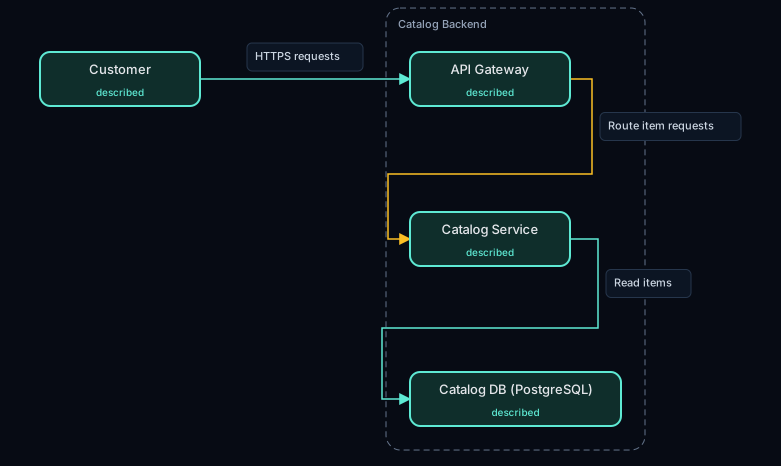
“A catalog app: customers call an API gateway; a catalog service serves items from PostgreSQL.”
A SHORTER PATH TO UNDERSTANDING
An idea in plain English. A public repository. A system you want to explain.
Describe your components and connections, or point to a public GitHub repository. Repository analysis reads source without running its code.
Find a component, inspect a relationship or trace a path through the diagram. See what came from your description, source code or an inference.
Refine the diagram in words. Download an SVG, PNG or JSON file for a design discussion, project handoff or README.
ONE SYSTEM. DIFFERENT PERSPECTIVES.
See the components, services and data stores that make a system work.
Follow a request through the participants, one interaction at a time.
Understand entities, fields and the relationships between them.
Explore a component and the responsibilities inside it.
BUILT TO BE QUESTIONED
Architecture diagrams are useful when you can inspect their assumptions. Archwoven makes those assumptions visible.
Explore the code and measured results (opens in a new tab)BEFORE YOU START
You can submit public GitHub repositories within the import limits. Spring Boot and FastAPI get framework-aware extraction. Other repositories get a bounded map of source modules and imports, with gaps disclosed. Private repositories can be analysed from a local clone using the local deployment.
No. The example above is a recorded diagram. Opening the workspace also does not start generation. AI is requested when you submit a description, analyse a repository, refine a diagram or expand a component.
New AI calls pause with a message explaining the applicable limit. Viewing and downloading an available diagram do not make another AI call. Download files you want to keep; hosted recovery copies are temporary.
Yes. Run the local deployment with Ollama. Local mode keeps generation on your machine. Setup instructions and limitations are in the repository README.
YOUR NEXT SYSTEM, MAPPED.